
Instructions for Inviting friends to Facebook Events
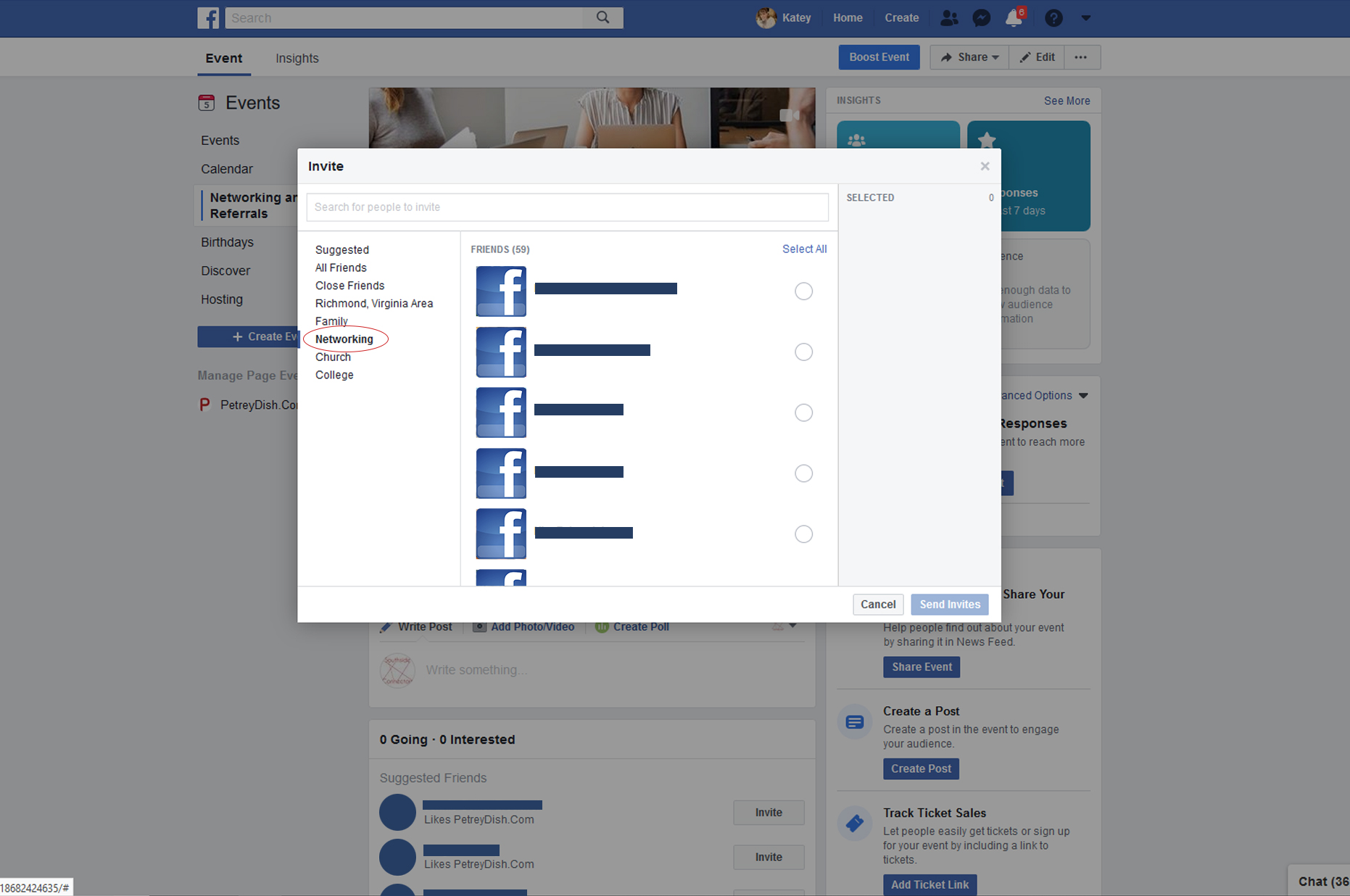

Please do NOT invite your entire friend list. It’s bad manners. Friends and family who are out of state do not need to be invited to
1. Open Facebook
2. Go your Facebook Page
3. Click the event’s tab
4. On the event click “Share” “Invite Friends”
5. Your list of Facebook friends will open as a pop-up.
6. Either you can go through your friend list and click each person individually, or for mass inviting…
7a. On the left of the open tab, under Suggested, click more
7b. Pick a town, area or group, such as Richmond, Chester, Midlothian, and hit “Select All” (shown in the bottom image screenshot.)
8. When all are selected, click “Send Invite”
9. You can take it a step further and SHARE the event in various groups that allow it
10. Message 5 highly active Facebook friends and ask them to invite a few people too. (“It would be super awesome if you would please do me a solid and invite 5-10 of your friends to my event who think might be interested. Thanks so much!!”)
11. Repeat all the steps above every week until the day of the event
Congratulations!! You have invited friends and family to your event with zero dollars!
Want to learn more about how to create friend lists? Click here!



digital marketing Facebook facebook events Facebook training marketing Social Media Social media for business training