
New Tab or Same Tab, That is the Question
Who really likes having lots of tabs open for the same website? Have you been annoyed because you clicked a link and it took you away from a site you weren’t done with yet? You aren’t alone.
It is common to use links in websites and blogs. Sometimes you might need to link to previous articles or other related pages on your site which is good for SEO (Search Engine Optimization). Or you may want to link to something OUTSIDE your site or blog. (Maybe you and another website or blogger will share a link back to you, also good for SEO.) When creating links, it is usually better to have the outsider’s link open a new window or tab. When on your own site, that isn’t necessary. I personally find that clicking on menu items that open multiple windows for the same site to be annoying. When new tabs are not opened to take you outside of the website it is also annoying. Many like the idea of closing a tab when done to return back you the original site/blog, your site/blog!! That is less likely to happen when the visitor is escorted away.
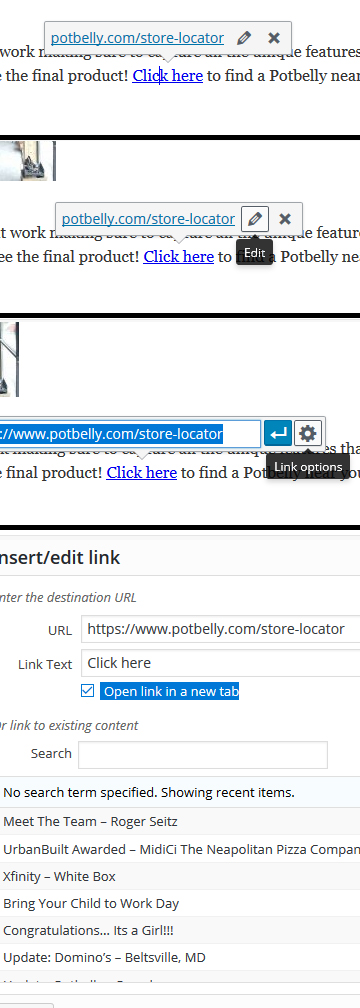
The photo to the right is a visual version on how to make sure your WordPress site’s or blog’s links are doing what they should be doing. For the readers, below is a list of link instructions.
- When in the editing portion of your post or page, click on the existing link
- Click the edit button (the little pencil)
- Click on link options button (the cog)
- To open a new tab or window, make sure the box is checked for “open a new tab”
- Click update.
- Make sure you also click update for the full post or page.
Easy peasy! All is corrected and set for the best results.


Blogging CMS Content Management Systems Linking Search Engine Optimization SEO Website WordPress