
Fired Over Social Media
There are many news reports about people that were fired or not getting hired because of things they posted on social media. Many news outlets have discussed whether or not it is ethical for employers to look at your social media accounts to get a sneak peek into your personal life and connections. It is illegal for employers to ask for passwords to your social media. That won’t stop them from looking publicly though. Be safe, cover your bases, and your butt.
Rule #1: When in doubt don’t post it.
Here are a few tips to avoid becoming a news story:
- Make sure your privacy settings are set correctly. Facebook LOVES to change privacy rules regularly.
- When in doubt, don’t post it! If it’s slightly questionable and you’re job hunting, it may be best to not post it.
- Keep in mind that phones can screengrab your content and even download your posts (when in doubt, don’t post it).
- Just because you took it down, doesn’t mean it has gone away (see the line above).
- The same rules apply to Twitter, YouTube, Instagram, Snapchat, and etc…
Here is a list of articles that go into more detail:
- mashable.com/2012/05/07/facebook-like-fired
- mashable.com/2012/07/30/social-media-fired
- mashable.com/2012/08/26/complain-boss-facebook
- thefinancialdiet.com/financial-confessions-lost-job-social-media-post
- themuse.com/advice/can-social-media-get-you-fired
Want to double-check your settings?
The people icon means that your friends can see the post. If you see a globe next to the post, then that means it is public to the world. A person does NOT have to be signed into Facebook or be your friend to see those posts.
To change the existing posts (the smaller circle) that may not be displayed to your friends, hover over the friend icon until the tiny arrow shows up to the right. Click on that and change your preference.
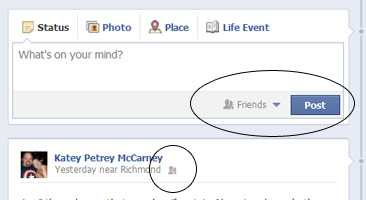
You can change your setting permanently (until Facebook decides to change it for you… again). Click on the tiny arrow next to “Home”. Go down to “Privacy settings” and click on it.
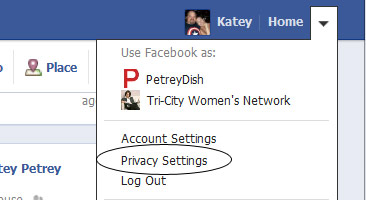
Once in “Privacy Settings” click on “Friends”. Friends well allow everyone you are friends with to see what your post. Public means that EVERYONE (even complete strangers) can see your post. I only recommend that setting for your name, profile photo, and maybe your education (if you want to connect to your old school mates. If you don’t care about your old school mates, then keep that private too!!
For questions or to learn more, feel free to give me a call at 804.402.0084 or email me at [email protected].
*Note: Post updated 12/19/19. The stories have only gotten worse from poor judgement to social media posts and use.*


Facebook Mashable privacy settings snapchat Social Media Twitter










2 Responses
Way cool! Some very valid points! I appreciate you writing this
write-up and the rest of the site is also really good.
[…] Fact: They are. (Ok. This is when I lose people so bear with me.) From the computer (yes, it makes a difference and is a whole different bag of worms from the app), when you are on the page, you will see your page profile icon next to whatever it is you are doing. You are acting as the business. Those who follow or like your page will not see when you post baby photos and political views in your personal world. Just be aware of which account you are in and when in doubt, don’t share! […]