Time Is Always Changing

Time is always changing. Cells die and divide. Earth is constantly moving and spinning. And so it the moon but with a little wave. Technology and science are forever evolving. Businesses change and grow.

I recently finished reading a book, “#GIRLBOSS” by Sophia Amoruso. She is the founder of a multi-million dollar fashion company called Nasty Gal. The book talks about how she started out on Ebay and made her way up to Forbes 30 under 30 list. It’s a really good read and it’s back on my reading list for later.

Time is always changing and so are you and your business. Sometimes, we are so busy we forget to take a step back and look at our big picture.

  • Where do we want to be in our business?
  • What do we need to do to get there?
  • What is tying up to much time?
  • Can let go of something or hire someone to do tasks better and more efficiently?
  • Are people asking for services no longer offer because of outdated websites or print?

If we aren’t ready to move forward (evolve) we could be left behind, passed over or forgotten. Here is a small list of changes that I finally got around to doing:

  • Updated my business card. I deleted my Tumblr account and the icon and address were still on my card. (Still love Tumblr. See my article for details.) I have a business Instagram account now that they allow access to multiple accounts (Thank you Instagram developers!!).
  • Updated my “About Us” on the website.
  • Deleted Newsletter page - though great ROI, I just didn’t have time for it and struggled with material. Plan to start it again in future.
  • No changes to my services.

When was the last time you reviewed your business? What can you do to evolve?

Related Posts:

Simple Website Revamping

Before
Before

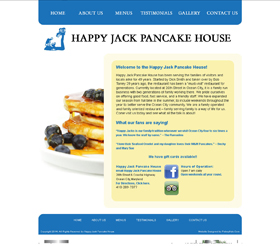
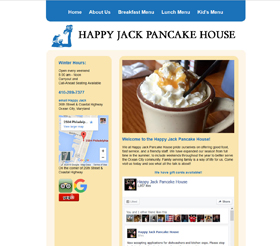
It doesn’t take a lot to revamp a website. Something as simple as updating photos or removing pages that you never got around to finishing. Do you have services or products you no longer offer? Are your discounts out of date? Are you using different brands than what was posted on website? Do you have new staff (or lose staff)? Something as simple as removing social media links you no longer use (please delete those accounts!!) It doesn’t take a lot.

After
After

Updating keeps your content fresh, keeps search engines happy and clients coming back. I know it can be time consuming, but taking that time to make sure it happens can go a long way. You not need to make changes every week, but a site untouch for over a year doesn’t do with with Google.

I just worked with Happy Jack Pancake House over the holidays to revamp their site. It was fun and easy. We emailed and talked on the phone to figure out what they wanted and made sure they got the results they needed. Most of their clients use tablets and smart phones. Their old site was not mobile friendly, but we took steps to make the site mobile friendly in the future. We simplified the pages, updated the design slightly and moved their most important content (hours, address and directions) into a more prominent location. They mentioned they do a lot of updated on Facebook so we added their Facebook feed so the content stays fresh (food pun!).

For more ideas on updating your website, click here.


Related Posts:

Happy New Year!

NavitiyIt’s that time of year again when we take the time to evaluate your business. What worked, what didn’t work? Analyze your social media. What did you struggle with? What was a success? Do you need to schedule time for social media to improve what you’re doing? Find a class to improve your skills or give me a call for suggestions.

Also take the time to look at your website. What works? What’s out of date? Are there new products or services that you’re offering. Can you stream line anything? It’s important to update your website. Doing something as simple as replacing your images with recent work can do wonders. Then remember to announce your updated website via social media, emails, newsletters, etc.

Related Posts:

Website Content

There is nothing wrong with looking at your competitor’s website to see what they have going on. There is nothing wrong with adding something they are doing to what you are doing. “They have a ________ product page?! I have that product too! I should put that on my website… and highlight it!”

There IS something wrong with copying their words and putting your name where theirs used to be. If your competition has a page about a service or product you provide, feel free to talk to your web specialist about adding that information to your site. Use your own words; your own voice. If you copy from a big name company, they could decide to sue for copyright infringement. Nobody wants to get sued, so don’t do it. Do yourself a favor and write your own text. If you struggle with getting your thoughts down, you can hire help who will question you and write it out all pretty for you. Click here for a list of questions to get the creative writing processes flowing.

Related Posts:

Creating Content For Your Website

We all get writer’s block from time to time. We know what we do and how we do what we do, but putting it down on paper to sell ourselves to customers is a whole other story.

For those who have a difficult time coming up with content for their new website, or getting around to finishing “under construction” pages, here are some questions to help you get what is locked deep down, out and onto your website.

Home Page (brief overview of the whole site)

  • What do you do – brief overview/highlight?
  • How long have you been in the industry?
  • How long have you owned your business?
  • Is this a family run/owned business?
  • Bullet list of Products/Services:

About Us Page (bragging page)

  • Do you have any special training/college degrees?
  • What are the core strengths of your organization?
  • Why do your customers want/use your products/services?
  • What sets your company apart from others in your industry?
  • Is there a unique aspect to your company that you could use as a point of differentiation?
  • Information about your company, its history, the people, their expertise
  • Company philosophy/creed, vision, mission

Product/Services Page

  • What are your product/services? What are you selling?
  • What services do your clients/prospects most want and need?
  • How do people feel after they use your products/services?

MISC

  • What are the main keywords/phrases that prospects might use to find you online?
  • Do you have an existing tagline, slogan or brand statement? If not, would you like to create one?
  • What is your target location (international/national/regional/state/local)?
  • Do you have any testimonials you can publish?
  • Any other information you may like to add??

For more ideas, go to the Content Questionnaire Page.

Related Posts:

Hosting Troubles

A great reason to hire someone like me to help you host your website is so I can deal with issues that might arise. For example, if you were hosting your website on your own and got hacked, how would you handle the situation? What would you do? How many hours would be lost replacing data, fixing files, and restoring things so the site was right again? Are you able to read code and write code to correct hacked coding? Did you even keep a back up on your own computer in case their backup was outdated or failed? For a small fee, all that stress can be off your plate and onto mine.

Things happen, cars break down, the house needs painting, a cockroach infestation occurs. I have a car repair person, but I don’t mind painting my own house, and I leave the bugs to the pros! Yes there are things we all can to that is preventative, but we still need help in different areas. Same goes for hosting your website and maintaining it.

Hosting companies do maintenance on their servers all the time. If their maintenance accidentally effected your website, would you be able to correct your site and get it back up and running correctly (restore it with your own backup)?

If your website or the blog on your website is WordPress based make sure you keep up with the updates. Those updates are often times to help combat those nasty hackers. Also, take the time to change your password every so often and make it a hard password that includes, capital letters, numbers and symbols. Yes, use all three!! (and be sure you write it on a post-it note and leave it in your desk drawer at your private home until you memorize it)

Related Posts:

Responsive Web Design

lewisPetreyDish.Com is very excited to announce that I have my first Responsive Web Design out on the Web for the world to see and a website responsive redesign in the wings waiting for review! The first design is very simple and clean. It does the job the client wanted and needed plus it’s a massive improvement from the “do-it-yourself” platform he was trying to work in. Creating his Responsive Website taught me a lot about what I need to do to move forward on helping my existing clients with their current websites!!

Responsive Web Design is designing a website that figures out what platform it’s on (be it phone, tablet, computer) and configuring itself to fit that platform. It removes the need to pinch and pull a website on smaller platforms so the site will be easier to use and read.

Related Posts:

A Picture Is Worth A Thousand Words

You are proud of your work and you should display it as such and want it to look its very best. When creating a website, Facebook fan page, blog, fliers, or any other form of advertisement, you want it to look amazing! I recommend hiring a professional photographer.

Here are a few tips on why using a professional photographer will enhance your photos:

1. Date Stamp: A professional photographer will not date stamp the picture. Having the date in the bottom right corner brings the quality of the photo down tremendously.

2. Clean Photo: A professional photographer will stage your photo. For example, if you are in construction, the photographer will take the picture so the huge pile of garbage is not in the shot and make sure that the area is clear and clean. If you are a landscaper, hoses will not be drawn across the lawn, shirtless workers or dented trucks will not be in the background. Empty soda bottle and hats will not be on the new island you just installed.

photosamples

3. Lighting: The photographer can advise on how the weather will affect the shot. They also know what to do to prevent or avoid the extreme shadows and highlights that reduce the clarity of the photo.

4. Clear Photo: A good photographer will keep him/her self out of the photo. It can be difficult to keep the camera flash from blowing out an area, your shadow and your reflection out of a shot. Taking a picture of a room with lots of mirrors is particularly hard, but a professional can do it.

Great photos have a positive impact on your website, social media and other advertisements. If you are unable to hire a photographer or have a friend that does amazing photography as a hobby, there are other options. You can use representations of your work. Stock photography is a great option. I recommend www.IstockPhoto.com for great looking photos (don’t use stock photos in your gallery/portfolio area). Be sure to read the fine print of other photo sample sites. They may have hidden fees where Istockphoto.com does not.

If you want to show off your work and talent, having your own professional pictures is the best way to go.

Related Posts:

Class update

I have registered for the Responsive Web Design class and will be in class for a full day next week. I can’t wait to come back and give you an update on that (and hopefully an example or two)!!

For those who don’t remember what Responsive Web Design is, it’s when you create 1 website that figures out what it’s on (computer, tablet, phone) and it adjusts itself accordingly to fit on that device and looks great and it easy to read on all of the devices. This will replace having a www.yourdomain.com and m.yourdomain.com or www.yourdomain.com/mobile, which is two different websites with two different designs, which means twice the work when making changes.

Related Posts: